Community-driven alpha discovery

Spot the signals.Stay in step.

Discover ideas in real discussions from 金蛙, Mirror, GDC and other communities. Follow Chitu CALL signals and global community activity, then check what FOMO traders and KOLs are buying and selling.

Community viewsChitu signalsTrading activity

iOS / Android · Direct alerts

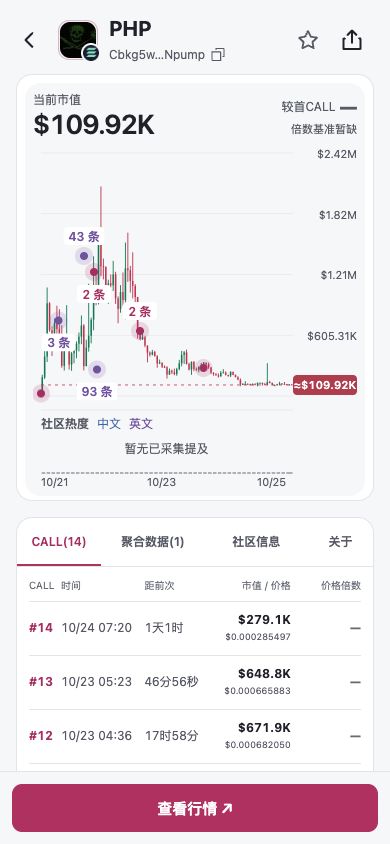
Actual light-mode app screen showing PHP CALL history and price chart
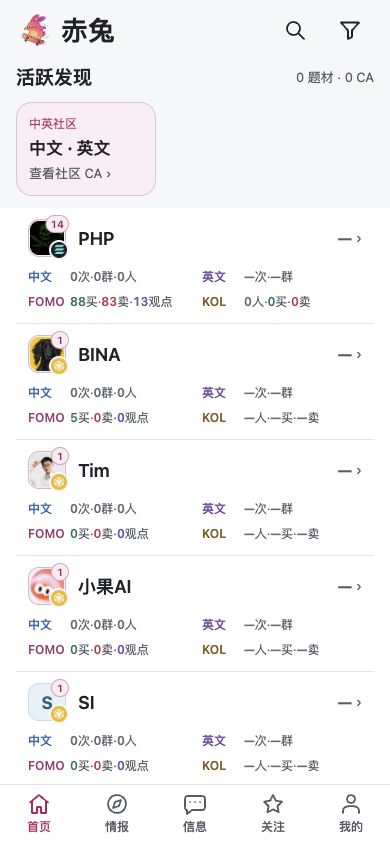
Chitu home in light mode, with access to CALL signals, communities and trader activity

01 Communities

Read the discussion. Check the signals.

Find a token in a discussion, then check its CALL timeline and price chart.

Community messages

What are people saying?
Read it in context.

Read group owners’ posts alongside member discussions, with original messages and context to understand why a token is getting attention.

All messagesOwner posts
Connected communities
0x0xSunCCryptoDScrazySenGGDC猫镭射猫蛙金蛙

Available communities are listed in the app.
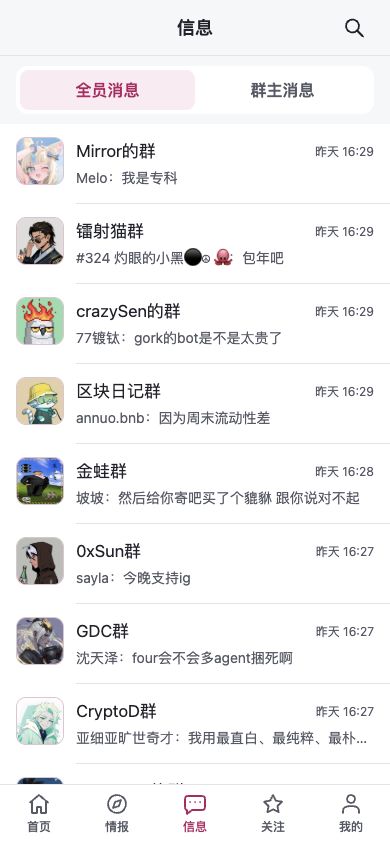
Chitu community messages in light mode: recent discussions from Mirror, GDC, 金蛙 and other communities

Chitu signals

When did the CALL happen?

See CALL timestamps on the price chart and follow what happened next.

CALL timelinePrice chart
Actual PHP CALL records and price chart in light mode

Home · CA details

Open a CA.
See the data and discussion.

Open a token from the home screen to see aggregated data and original community discussions.

CA details overview
Select a CA on HomeToken details
CALLAggregated dataCommunity infoAbout

Aggregated data

Who traded this token? What signals appeared?

  • FOMO trades and views
  • KOL activity and wallets
  • Related trending topics

Community info

Which communities and people are discussing it?

  • Chinese and global mentions
  • Groups and contributors
  • Collected messages and original Chinese text

02 Activity & trades

Who’s watching? Who’s trading?

Found a token that interests you? Check global community activity, FOMO traders and KOL transaction records.

Trader activity

Who’s buying, and how much?

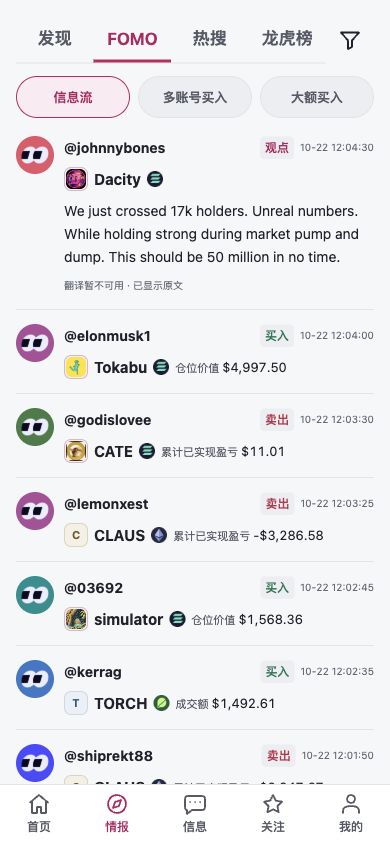
Browse trades and trader views, or focus on tokens bought by multiple accounts and large purchases.

1Activity feed
Follow trades and trader views in time order.
2Multi-account buys
Choose a time range to see which tokens multiple accounts bought.
3Large buys
Set a minimum transaction amount to filter qualifying purchases.

In the app, multi-account buys appear under “多账号买入”.

Actual FOMO feed in light mode, with tabs for the activity feed, multi-account buys and large buys

03 Alerts

Chitu app · System notifications

Alerts to your phone.No VPN needed.

Tap an alert to open the relevant token and signal details.

01

Chitu CALL

Review first, follow-up and consecutive CALL signals with timestamps and price charts.

02

Sustained buying

Get an alert when buying continues after a CALL.

03

Advanced trader signals

See tokens bought by advanced traders, participant counts and purchase amounts.

04

Weibo trending CA alerts

When a CA is linked to a trending topic, see the topic and its token together.

05

Rising community activity

Get a reminder to check messages when community discussion picks up.

06

Activity & buying alignment

Get an alert when community activity and buying signals strengthen together.

Choose your alert preferences in the app and enable system notifications on your phone.

Notification illustration · Appearance varies by device

04 Product tour & tutorial

Take a look, then try it.

Learn how to read community messages, explore token details and trade records, and set up alerts.

Communities & signalsActivity & tradesAlert settings
YouTube

Use cases

How could Chitu fit your day?

Illustrative use cases. Avatars and stories are fictional, not real customer testimonials.

Ericy

Follows community discussions

Read the messages. Check the data.

“I want to understand why a token is suddenly getting attention. Chitu lets me read the group owner’s posts and surrounding conversation, then open the CA to check the data.”
Original discussions · CA details

Momo

Busy during the workday

A heads-up when things change.

“I can’t watch my phone all day. I turn on sustained buying and community activity alerts, then check what happened when a notification arrives and decide whether to keep following.”
Sustained buying · Community activity

林哥

Cross-checks multiple sources

Discussion matters. So does buying.

“I compare global community activity, FOMO updates and KOL transactions. Having these sources around the same CA saves me time looking up records.”
Global communities · FOMO · KOLs

05 Membership

Choose a plan that fits.

Contact us for a free Android trial before subscribing. iOS invitations require a membership of six months or longer.

  • Group chats & owner posts
  • Chitu CALL signals
  • Global community activity
  • FOMO trader activity
  • KOL transaction data
  • Phone notifications

Quarterly

3-month membership

129U

Half-year

6-month membership

209U

Annual

12-month membership

369U

Early-bird offer

Message Xiaoshidi for an early-bird discount.

Try Android. Then decide.

Contact Xiaoshidi for a trial code. Enter it during sign-up and verify your email. Your trial starts once registration is complete, for the period set by your code. Subscribe if it works for you.

Download for AndroidDownload and install

iOS does not currently offer a free trial. Access is by invitation and requires a membership of six months or longer. Contact Xiaoshidi to confirm invitation availability before subscribing.

Choose whether to subscribe when your trial ends. No automatic charges.

Chitu rabbit celebrating in sunglasses
How do I get a free Android trial?

New Android users can contact Xiaoshidi on X, Telegram or WeChat for a one-time trial code. Enter the code during sign-up, then verify your email after the code is validated. Your trial starts when registration is complete; a valid code shows the estimated expiry time. The trial includes community messages, Chitu signals, global community activity, FOMO and KOL data, and alerts. Decide whether to subscribe when it ends. There are no automatic charges.

Is there a free iOS trial?

There is currently no free iOS trial. iOS access is by invitation and requires a membership of six months or longer. Contact Xiaoshidi to confirm invitation availability and device compatibility before subscribing. To try the service first, use an Android device.

What can I see in Chitu?

Community messages, group owner posts, Chitu CALL signals, global community activity, and trades by FOMO traders and tracked KOLs. Open a token to explore further.

Which communities are available?

Messages and owner posts from connected communities including 金蛙, Mirror and GDC. Check the app for the current list and available content.

What does global community activity measure?

Mention counts, group counts and activity trends from connected global sources, viewable by time range.

How do I receive alerts?

Enable phone notifications and choose your alert preferences in the app. CALL, sustained buying and community activity alerts arrive directly on your phone, with no VPN needed. Tap a notification for details.

How do I get started after installing?

Get a trial code, install the app, and choose Sign up. Enter your email and trial code, then verify your email. Existing users can sign in directly; contact Xiaoshidi to renew a membership. Start with a familiar community, then open a CA to explore signals and trades. Enable system notifications and choose the alerts you want.

ChituCommunity-driven alpha discovery
Get the app

Contact Xiaoshidi

Open Telegram ↗

Scan the code, or copy the account and search for it.